Why Lighting is the Most Critical Component
The uncomfortable truth: A £200 camera with perfect lighting will outperform a £5,000 camera with poor lighting.
Lighting determines:
- Whether defects are visible at all
- Contrast between features and background
- Consistency across production shifts
- System reliability over time
Yet lighting is often an afterthought, budgeted last after cameras and software consume the funds. This guide helps you get it right the first time.
The Fundamentals
How Light Reveals Defects
Every defect detection task comes down to one question: How do we make the defect look different from the good area?
Light interacts with surfaces in predictable ways:
| Interaction | What It Reveals | Example Defects |
|---|---|---|
| Reflection | Surface angle changes | Dents, bumps, warping |
| Absorption | Material differences | Stains, contamination |
| Transmission | Internal structure | Bubbles, inclusions |
| Scattering | Surface texture | Scratches, roughness |
Your lighting strategy exploits these interactions to maximise contrast.
The Three Lighting Variables
1. Angle of Incidence
- Low angle (0-30°): Highlights surface texture
- Medium angle (30-60°): Balanced visibility
- High angle (60-90°): Emphasises shape/edges
2. Light Quality
- Direct (harsh): High contrast, strong shadows
- Diffuse (soft): Even illumination, reduced shadows
- Structured: Reveals 3D information
3. Wavelength (Colour)
- Matched to object: Maximum reflection
- Complementary: Maximum absorption
- UV/IR: Reveals invisible features
Lighting Techniques: When to Use Each
1. Ring Lights
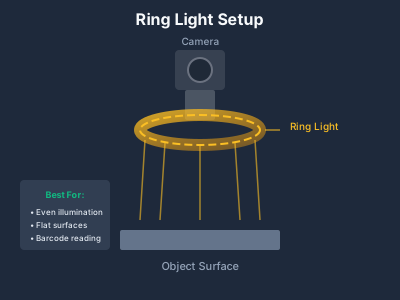
What they are: Circular LED array mounted around the camera lens.
Best for:
- General inspection
- Flat, matte surfaces
- Presence/absence checks
- Barcode reading
Not suitable for:
- Shiny/reflective surfaces (creates hotspots)
- Surface defect detection
- Large field of view
Typical cost: £80-400
Configuration tips:
- Mount as close to the object as practical
- Choose diffuse versions for less reflective glare
- Consider segmented rings for directional control
1
2
3
4
5
6
7
8
9
10
11
12
13
14
15
16
17
18
19
20
21
22
23
24
25
26
# Ring light works well when you need even, shadowless illumination
# Example: Checking component presence on a PCB

import cv2
import numpy as np

def check_component_presence(image, template_regions):
    """
    With good ring light illumination, simple thresholding
    often works for presence/absence detection.

    Note: For production environments, Normalized Cross-Correlation
    (Template Matching) is much more robust against ambient light
    changes and LED aging than raw intensity thresholding.
    """
    gray = cv2.cvtColor(image, cv2.COLOR_BGR2GRAY)
    results = {}

    for name, (x, y, w, h) in template_regions.items():
        roi = gray[y:y+h, x:x+w]
        mean_intensity = np.mean(roi)

        # Components typically darker than empty pads
        results[name] = "present" if mean_intensity < 180 else "absent"

    return results
2. Bar Lights (Linear Lights)
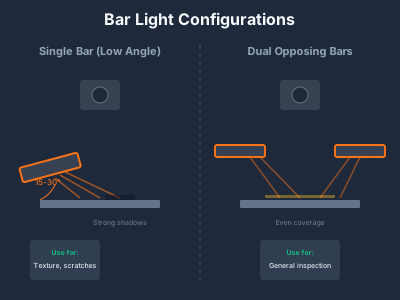
What they are: Rectangular LED arrays, typically 50-500mm long.
Best for:
- Line scan applications
- Wide field of view
- Directional illumination needs
- Conveyor inspection
Not suitable for:
- 360° inspection (without multiple bars)
- Very small fields of view
Typical cost: £100-800
Configuration patterns:
| Setup | Effect | Use Case |
|---|---|---|
| Single bar, low angle | Strong shadows, texture emphasis | Scratches, surface defects |
| Dual opposing bars | Reduced shadows | General inspection |
| Quad configuration | Even coverage | Complex geometry |
3. Backlight (Transmitted Illumination)
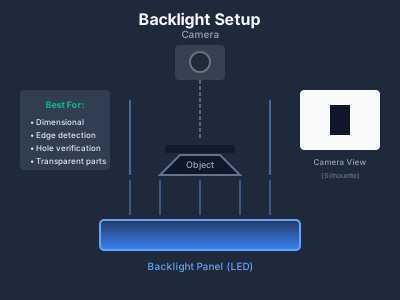
What they are: Flat LED panel positioned behind the object.
Best for:
- Dimensional measurement
- Edge detection
- Transparent object inspection
- Silhouette analysis
- Hole/slot verification
Not suitable for:
- Surface defect detection
- Colour inspection
- Opaque object features
Typical cost: £100-600
Why it works:
Backlight creates maximum contrast between object edges and background. The object appears as a perfect silhouette, eliminating surface variations.
1
2
3
4
5
6
7
8
9
10
11
12
13
14
15
16
17
18
19
20
21
22
23
24
25
26
27
28
29
30
31
32
33
# Backlight enables precise dimensional measurement
import cv2
import numpy as np

def measure_part_dimensions(backlit_image):
    """
    With backlight, edge detection becomes trivial
    """
    gray = cv2.cvtColor(backlit_image, cv2.COLOR_BGR2GRAY)

    # Simple threshold works perfectly with backlight
    _, binary = cv2.threshold(gray, 50, 255, cv2.THRESH_BINARY_INV)

    # Find contours
    contours, _ = cv2.findContours(binary, cv2.RETR_EXTERNAL,
                                    cv2.CHAIN_APPROX_SIMPLE)

    if contours:
        # Get bounding rectangle
        x, y, w, h = cv2.boundingRect(contours[0])

        # Calculate real dimensions (assuming calibration)
        pixels_per_mm = 20  # From calibration
        width_mm = w / pixels_per_mm
        height_mm = h / pixels_per_mm

        return {
            'width_mm': round(width_mm, 2),
            'height_mm': round(height_mm, 2),
            'area_px': cv2.contourArea(contours[0])
        }

    return None
4. Dome Lights (Diffuse Illumination)
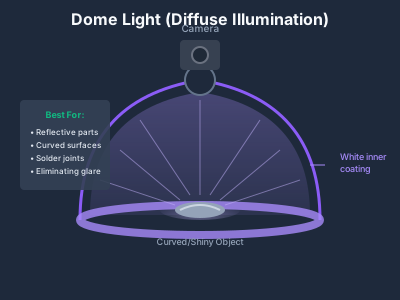
What they are: Hemispherical enclosure with internal LED illumination.
Best for:
- Highly reflective surfaces
- Curved objects
- Eliminating shadows
- Consistent illumination regardless of surface angle
Not suitable for:
- Surface texture detection
- Defects that need shadow enhancement
- Large parts (dome size limited)
Typical cost: £300-2,000
How they work:
Light enters the dome and reflects multiple times off the white interior, creating completely diffuse illumination from all angles. No matter which way the surface faces, it receives equal light.
Application examples:
| Industry | Application | Why Dome Works |
|---|---|---|
| Electronics | Solder joint inspection | Shiny, curved surfaces |
| Medical | Polished implant checking | Eliminates glare |
| Automotive | Chrome trim verification | Uniform reflection |
| Packaging | Foil seal inspection | Highly reflective |
5. Coaxial Lights (On-Axis Illumination)
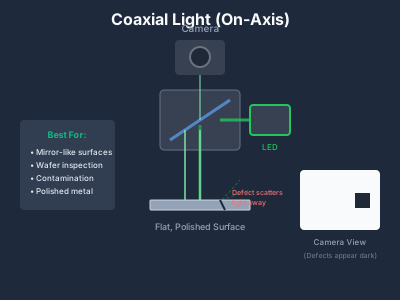
What they are: Light projected through a beam splitter, exactly aligned with camera axis.
Best for:
- Specular (mirror-like) surfaces
- Flat, polished parts
- Wafer inspection
- Surface contamination on shiny materials
Not suitable for:
- Matte surfaces
- Textured materials
- 3D geometry
Typical cost: £400-2,500
How they work:
1
2
3
4
5
6
7
Camera
  ↓
[Beam Splitter]
  ↓ (light in)
  ↓ (image up)
  ↓
Object (flat, shiny)
Light travels down through a 45° beam splitter, hits the object, reflects straight back up, and passes through the splitter to the camera. Any surface irregularity (scratch, dent, contamination) scatters light away, appearing dark.
Critical setup requirements:
- Object must be flat and perpendicular to camera
- Highly inefficient light path: ~75% light loss, requiring high-intensity LEDs
- Clean optics essential (dust shows immediately)
6. Darkfield Illumination
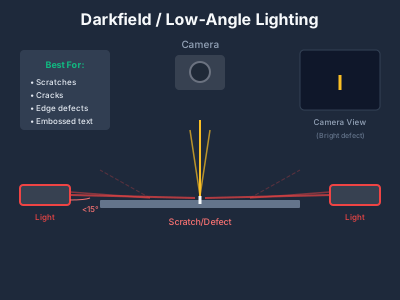
What they are: Very low-angle lighting (typically <15° from surface).
Best for:
- Surface scratches
- Cracks and fractures
- Edge defects
- Embossed features
Not suitable for:
- General inspection
- Colour analysis
- Deep features
Typical cost: £200-1,000 (using bar lights at low angle)
Why it works:
At extremely low angles, smooth surfaces reflect light away from the camera (appearing dark). But scratches, edges, and defects scatter light upward toward the camera (appearing bright).
1
2
3
4
5
6
7
8
9
Camera sees: Dark background, bright defects

     Camera
       ↓

   Dark  BRIGHT  Dark
    ↓    (defect)  ↓
[Light]→  ═══════  ←[Light]
         Surface
Implementation:
1
2
3
4
5
6
7
8
9
10
11
12
13
14
15
16
17
18
19
20
21
22
23
24
25
26
27
28
29
30
31
32
33
34
35
36
37
38
39
40
41
42
43
44
45
# Darkfield makes scratches pop against background
import cv2
import numpy as np

def detect_scratches_darkfield(image, sensitivity=30):
    """
    With darkfield lighting, scratches appear as bright lines
    on dark background - simple thresholding works.
    """
    gray = cv2.cvtColor(image, cv2.COLOR_BGR2GRAY)

    # Scratches are bright in darkfield
    _, bright_features = cv2.threshold(
        gray, sensitivity, 255, cv2.THRESH_BINARY
    )

    # Connect nearby pixels (scratches are linear)
    kernel = cv2.getStructuringElement(cv2.MORPH_RECT, (3, 1))
    scratches = cv2.morphologyEx(bright_features, cv2.MORPH_CLOSE, kernel)

    # Find and filter contours
    contours, _ = cv2.findContours(
        scratches, cv2.RETR_EXTERNAL, cv2.CHAIN_APPROX_SIMPLE
    )

    scratch_defects = []
    for cnt in contours:
        # Scratches are elongated and can appear at any angle.
        # minAreaRect creates a rotated bounding box to perfectly frame
        # diagonal scratches without artificially distorting the aspect ratio.
        rect = cv2.minAreaRect(cnt)
        (x, y), (w, h), angle = rect

        width = max(w, h)
        height = min(w, h) + 1e-5  # prevent division by zero
        aspect = width / height

        if aspect > 3 and cv2.contourArea(cnt) > 50:
            scratch_defects.append({
                'location': (int(x), int(y)),
                'length': round(width, 2),
                'area': cv2.contourArea(cnt)
            })

    return scratch_defects
7. Polarized Illumination (Cross-Polarization)
What they are: A light source fitted with a polarizing filter, paired with a perpendicular polarizing filter attached to the camera lens.
Best for:
- Eliminating harsh glare and specular reflections
- Inspecting through clear packaging (blister packs, shrink wrap)
- Reading barcodes on glossy labels or curved plastics
- Inspecting wet, oily, or varnished surfaces
Not suitable for:
- Bare metal inspection (metals scramble polarization)
- High-speed lines (polarizers block ~60-70% of total light)
Typical cost: £50-200 (for the optical filters, added to existing lights/lenses)
How it works:
The light source emits light polarized in one direction (e.g., horizontally). When this light hits a dielectric (non-metallic) surface like plastic or liquid, the harsh glare reflects back horizontally. The camera’s filter is turned 90° (vertically), completely blocking the harsh horizontal glare while allowing the diffuse, unpolarized light containing the actual object details to pass through.
8. Structured Light
What they are: Projected patterns (lines, grids, dots) onto the object surface.
Best for:
- 3D measurement
- Height/depth inspection
- Weld bead analysis
- Volume measurement
Not suitable for:
- High-speed applications
- Transparent objects
Typical cost: £1,500-15,000 (including projector + camera)
Types of structured light:
| Pattern | Speed | Accuracy | Best For |
|---|---|---|---|
| Single line | Fastest | Lower | Simple profiles |
| Multiple lines | Medium | Medium | Surface mapping |
| Phase shift | Slowest | Highest | Precision 3D |
| Random speckle | Fast | Medium | Texture surfaces |
9. Multi-Angle / Photometric Stereo
What they are: Multiple light sources fired sequentially, images combined for surface analysis.
Best for:
- Complex surface defects
- Texture inspection
- Removing confusing surface patterns
Not suitable for:
- Moving objects (unless strobed rapidly)
- Budget-constrained projects
Typical cost: £500-3,000 (multi-channel controller + lights)
Lighting Selection by Application
Quick Reference Table
| Defect Type | Primary Technique | Alternative |
|---|---|---|
| Missing component | Ring / diffuse | Backlight |
| Glare on plastic/liquid | Cross-Polarization | Dome |
| Scratches | Darkfield | Low-angle bar |
| Dents/bumps | Low-angle bar | Structured light |
| Contamination (shiny) | Coaxial | Dome |
| Contamination (matte) | Ring / bar | Diffuse |
| Dimensional | Backlight | Structured light |
| Surface texture | Darkfield | Multi-angle |
| Colour defects | Diffuse (dome/ring) | Cloudy day |
| Weld quality | Structured light | Low-angle |
| Print/label | Diffuse | Ring |
| Transparent defects | Backlight | Polarized / Darkfield |
| Hole/slot presence | Backlight | Ring |
By Industry
Electronics/PCB:
- Solder joints → Dome or coaxial
- Component presence → Ring light
- Trace defects → Darkfield
- Dimensional → Backlight
Automotive:
- Paint defects → Dome + multi-angle
- Machined surfaces → Coaxial
- Assembly verification → Ring
- Weld inspection → Structured light
Pharmaceutical/Packaging:
- Blister pack → Backlight + diffuse
- Label verification → Diffuse ring
- Seal inspection → Coaxial/darkfield
- Tablet defects → Dome
Metal/Machining:
- Surface finish → Darkfield
- Dimensional → Backlight
- Burrs/chips → Low-angle bar
- Cracks → Darkfield + fluorescent penetrant
Practical Implementation
LED Wavelength Selection
| Colour | Wavelength | Best For |
|---|---|---|
| Red (630nm) | Sharp edges, dimensional | Backlight, general |
| Green (530nm) | Human eye peak sensitivity | Visual inspection |
| Blue (470nm) | Fluorescence excitation | Special materials |
| White | Colour inspection | Most applications |
| IR (850nm) | See through some materials | Penetration |
| UV (365nm) | Fluorescence, special marks | Security, contamination |
Colour filtering principle:
- Same colour light + same colour object = bright
- Opposite colour light + object = dark
Strobe vs Continuous
| Factor | Continuous | Strobe |
|---|---|---|
| Motion blur | Limited speed | Freeze fast motion |
| Intensity | Lower | 10-100x higher |
| Heat | Continuous | Minimal |
| Cost | Lower | Higher (controller needed) |
| Complexity | Simple | More setup |
Rule of thumb: If your exposure time > 1/1000s and objects are moving, consider strobe.
Strobe timing calculation:
1
2
3
4
Object speed: 1 m/s
Acceptable blur: 0.1mm
Required exposure: 0.1mm / 1000mm/s = 0.0001s = 100μs
Strobe duration: <100μs
Common Mistakes to Avoid
1. Buying the Camera First
Always select lighting before finalising camera specs. Proper lighting often allows using a cheaper camera.
2. Underestimating Reflections
Shiny objects need diffuse lighting or cross-polarization. No amount of software can fix clipped glare hotspots.
3. Ignoring Environmental Light
Production floors have windows, overhead lights, seasonal changes. Either shield your inspection zone, or strobe bright enough to overwhelm ambient light.
4. Single-Source Thinking
Many applications need combination lighting:
- Backlight + front light
- Dome + low-angle
- Multiple angles for different defects
5. Forgetting LED Ageing
LEDs dim over time (10-20% per year in industrial settings). Budget for:
- Higher initial intensity
- Periodic intensity recalibration
- Eventual replacement
Budget Guidelines
By System Tier
| System Level | Lighting Budget | Typical Setup |
|---|---|---|
| Prototype | £50-200 | Basic ring/bar |
| Entry production | £200-800 | Quality ring/bar + controller |
| Professional | £800-3,000 | Dome/coaxial + strobe controller |
| Enterprise | £3,000-15,000 | Custom multi-zone, structured light |
Conclusion
Lighting is where machine vision projects succeed or fail. The best camera and software cannot compensate for poor illumination.
Key takeaways:
- Budget 30-50% of camera cost for lighting
- Test with real defect samples before committing
- Match technique to defect type (use polarization for glare, darkfield for scratches, backlight for dimensions)
- Plan for environmental factors and LED ageing
Next Steps
- Use our Camera Resolution Calculator to size your imaging
- Read our Camera Selection Guide
- Calculate ROI with our ROI Calculator